


As a full time traveler living and working on the road, I know the importance of staying connected. Travel eSIMs play a vital role in helping me ensure I have mobile network coverage from pretty much anywhere in the world; gone are the days of hunting for local SIM cards or dealing with expensive roaming charges, eSIMs have really changed the game for travelers like myself.
Not all eSIMs are created equal though, and it can be hard knowing which provider to choose – especially as in 2025, there is a lot of competition. Lets face it: when you’re planning a trip, the last thing you want to be doing is sifting through different eSIM providers, trying to work out which one offers the best value and is the most reliable.
I recently came across the eSIM company Jetpac and I was curious to see how they compare to other eSIM’s I’ve used and reviewed in the past, including Holafly, Sim Local, and Airalo. Here’s my honest review.
Tip: This post was first published in 2025 and has been updated for 2026 to reflect current pricing, features, and coverage.
What's the Deal with Jetpac's eSIMs?
Jetpac is a new Singapore-based company that promises a range of travel perks beyond just providing data.
The most notable of these is their SmartDelay program; this provides you and up to five companions free access to airport lounges if your flight is delayed for over an hour. This is definitely not something I’ve come across before– an eSIM that promises to keeps you connected AND gets you into an airport lounge for free? Sounds too good to be true– so I was pretty keen to check them out!
Considering their competitive prices, I was curious to see how they’re able to offer these perks and wondered whether or not elements like coverage would be compromised in return.
This led to me deciding to put them to the test and try using a Jetpac eSIM on a recent trip to Europe. I tested the setup process, as well as using the eSIM while traveling (often in quite remote places).

My TL;DR Review:
Jetpac’s eSIMs are surprisingly cheap and super easy to set up. I tested their Europe plan and found it great for multi-country travel, with mostly solid coverage (a few patchy spots, but to be expected in Europe).
Unlimited data plans are now available in select regions. The pricing, smooth setup, and bonus perks like free airport lounge access if your flight’s delayed make it a great eSIM option I’ll definitely use again.
Current Jetpac Pricing, Plans, and Where it Works
Jetpac currently offer eSIMs that can be used in 200+ destinations worldwide, and these can be purchased both on their mobile app and online website. They have a search feature on the app, which allows you to type in where you’re going and view all of the available eSIM packages for that destination.
Each destination has various package options, which you can select depending on data size and number of days. These are priced very competitively, and Jetpac offers some of the cheapest eSIMs I’ve seen recently.
Especially for new users of the app, you can pick up a 4-day 1GB eSIM for just $1 for most destinations around the globe.
Tip: A promising and unique feature is that in 2026, Jetpac advertises usage of certain apps after data runs out: Even if you exhaust your data pack, Jetpac keeps WhatsApp, Uber, Grab, and Google Maps running. For most travelers, these are the four apps you most need in a pinch, so you won't find yourself stranded without navigation or unable to message someone while you sort out a top-up.
Like many of their competitors, Jetpac offers regional packages as well as single-destination ones. These are what I usually go for since I'm mostly planning trips that involves border crossings and multi-stop adventures.
Here’s a quick look at the regional eSIMs Jetpac offers:
How do Jetpacs eSIMS Work?
- Global: Jetpacs global SIM-card offerings are pretty extensive, with 12 options to choose from. All of them work across 95 different countries, and they vary in data size and the number of days - from 1GB over 4 days, right up to 50GB over 365 days, and plenty of others in between
- Southeast Asia: There are nine Southeast Asia options to choose from, all of which work across Indonesia, Malaysia, Philippines, Singapore, Thailand and Vietnam. Starting with a 7 day, 3GB data pack for just $12, up to a 30 day, 40GB data pack for $60, there are some good deals in there. A recent addition is the unlimited data plan for this region with options of up to 30 days for $66. It’s a shame that they don’t offer countries across the entire region though - but as of 2026, Cambodia is included, which it wasn't previously.
- Asia-Pacific: There are nine sim cards on offer for this region, providing coverage in 16 different countries, from Australia to Macau. The cheapest package offers 1GB of data which can be used over 4 days and costs only $1, and the largest pack is the unlimited data over 30 days at $66.
- Europe: Europe one part of the world where I think a regional sim card is a very worthwhile purchase. If you’re planning on traveling in Europe, you’ll likely be hopping between multiple countries and crossing borders overland, so having a regional sim card saves a whole load of hassle. Jetpacs Europe eSIMs work in 30 different countries throughout the region, and start at just $1 for 1GB of data over 4 days. Unlimited plans are offered in Europe; 3 days is currently $13, and 30 days runs $66.
- North America: Jetpacs North America regional eSIMs work in Canada and the US, and there are 8 different options to choose from. The cheapest package starts at $1 for 1GB of data across 4 days, and the other packages go up to $70 for 40GB of data over 30 days. Interestingly, there is no unlimited plan for North America, but there is for the United States.
- Middle East and North Africa: There are 8 eSIM options for this region, and all of them cover Egypt, Kuwait, Morocco, Oman, Qatar, Saudi Arabia, Turkey, and the UAE. These regional eSIMs are a bit more expensive than Jetpacs options for other areas - their cheapest $1 for 1GB over 4 days, $14 for 3GB of data across 7 days, and their most expensive is $132 for 40GB of data over 30 days.
- Latin America: Jetpacs Latin America sim cards work across most of the region, covering 16 countries. These are Argentina, Brazil, Chile, Colombia, Costa Rica, Dominican Republic, Ecuador, El Salvador, Guatemala, Honduras, Mexico, Nicaragua, Paraguay, Peru and Uruguay. I’ve noticed that a lot of other eSIM providers don’t provide coverage in half of these countries within their Latin America regional sims, so Jetpac stands out on this front. Their cheapest option is $13.50 for 3GB of data over 7 days, and their most comprehensive pack costs $135 for 40GB over 30 days.
- Caribbean: The Caribbean is another area that I think regional sims work well for, as a lot of travellers choose to island hop and explore by boat, so finding a sim card in each different spot might be difficult. Jetpac has five Caribbean sim options, each of which work across 21 different islands and nations. The cheapest option is the $1 sim that works for 4 days and provides 1GB of data, and the most expensive one is the 20GB package that costs $60 and works for 30 days.
- Africa: Jetpac currently have 6 Africa regional sims. They all cover Algeria, Ghana, Kenya, Nigeria, South Africa, Tanzania, and Zambia. Their cheapest package costs $6 for 1GB of data over 4 days, and their most comprehensive package costs $101 for 20GB over 30 days.

Jetpac offers a few different setup options when you purchase an eSIM.
Depending on whether you purchase the eSIM through Jetpac’s website or mobile app, there are slight differences in the activation process. Whichever one you choose, you can enjoy a seamless setup process that allows you to activate your data plan within minutes - just what you want when you arrive in a new destination.
Option 1: Purchasing via the Jetpac Website
- Buy Your eSIM – Choose your destination and preferred data plan on Jetpac's website.
- Receive Your QR Code – After purchase, you’ll receive an email with a QR code and setup instructions.
- Install Your eSIM – On your phone, go to Settings > Mobile Network > Add eSIM, then scan the QR code.
- Activate Upon Arrival – Turn on the eSIM when you land and enable data roaming to start using your plan.

Option 2: Purchasing via the Jetpac App
- Download the Jetpac App – Available on iOS and Android.
- Select Your Plan – Browse Jetpac’s available eSIM plans and purchase directly in the app.
- Instant Installation – If your phone supports direct installation, you can add the eSIM to your device in just a few taps—no QR code needed.
- Activate and Connect – Like the website option, simply turn on your eSIM when you arrive at your destination.
Jetpac Review: Purchase and Setup Process
Selecting a Destination
I opted to use the mobile app when testing the sim, so I typed my destination into the search bar and clicked on the United Kingdom to see their options.
I did have a bit of trouble finding the search bar in the first place - it’s under ‘packs’ rather than on the home screen, which seems to be more tailored towards showing Jetpacs regional sim packs.
One feature I did appreciate is that on the search page, the option to change the display currency is very clear and accessible - we all know converting between currencies can be a bit of a headache when making online purchases, so I appreciated this. I clicked on my destination and was shown the different pack options, including their new user offer of 1GB of data for $1. It was easy to compare what each different pack offered through the ‘pack details’ button, which showed all of the important information like the supported networks, validity, and countries.

Payment
Before being taken through to the payment screen, I was asked how many packs I wanted to purchase, and once on the purchase screen, I had to confirm if it was for myself or others.
I’ve never seen this feature before and think it’s so useful - it would be really helpful for families travelling together. On the checkout page I entered my card information and was taken through to pay quickly. There wasn’t an apple pay integration on the app which is a shame as it’s easier to pay this way, but it was still quick and straightforward.

Setting up the eSIM
After the payment was complete, the next step was to choose who to assign the eSIM to - again, this would be a super helpful feature for situations where you’re travelling with others and need to purchase their eSIM.
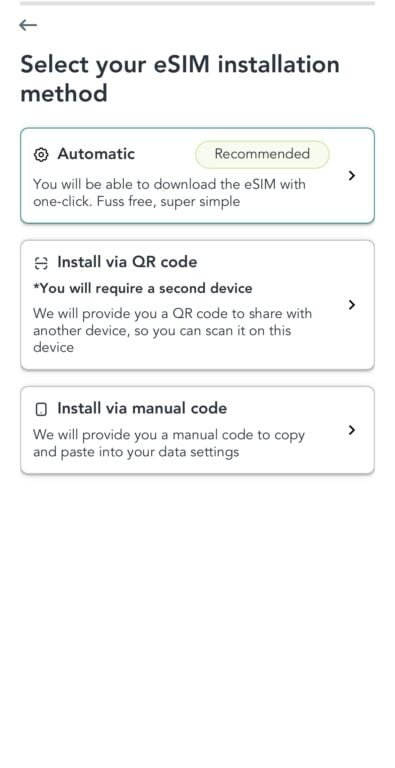
It took me to a checklist screen next and then offered three different installation methods: automatic, via QR code, and via a manual code. Having the option to install via a QR code is great for when you’re working off of two devices, which is helpful for me as a digital nomad.
I opted for the automatic installation and from there I was shown instructions for each step of the installation. After that, it was just a case of clicking through to ‘begin eSIM Installation’ and the app automatically initiated the activation.



Labelling the eSIM
Once the sim was activated, I exited the app and found my eSIM by opening Settings > Mobile Network to label my eSIM. This is an important step when you’ve got multiple sim cards on the go, and it ensures you avoid hefty roaming fees by accidentally using the wrong sim.

Selecting the eSIM for mobile data on my phone
I also made sure to check my new eSIM was the one with mobile data turned on, so I avoided my phone defaulting to the wrong sim card.
Checking the eSIM is Working
Jetpac immediately sent me a text to confirm that the eSIM was installed, which was great as it meant I knew I was ready to go.
I still tested it by loading up a website on Google Chrome and it worked!

Jetpac Review: Coverage and Network Performance
Connection was instant and I had coverage straight away.
This is one of the major pros to using an eSIM in my opinion; they allow you to avoid one of the biggest stressors when arriving in a new place, and mean you hit the ground running. It’s so helpful to have access to data straight away, particularly in very chaotic and busy airports.

When I first started using the sim the coverage was great, and I had 5/4G consistently. As the day went on however, I did notice my signal varied quite significantly in some areas. There were points where my internet dropped down to LTE and wasn’t strong enough to load any form of media, and it was also taking longer than usual to send internet messages.

This wasn’t too much of an issue on this occasion, as I was mainly in cities while testing this eSIM - so wasn’t too far from places with free wifi. If I had been traveling in more remote areas though, this would have caused huge issues; especially as I often find myself tethering from my hotspot to my laptop to get work done.
However, It’s very possible I was just in low service areas. According to Jetpacs website, the eSIM I purchased connects to the networks three, EE and O2 - which are the biggest and most popular networks within the UK, so it seems strange that I would struggle with connection. As I didn’t have another sim running to compare it too, it’s really hard to say. Jetpac has plenty of fantastic reviews on trustpilot, many of which mention their good coverage - so maybe I was just unlucky on that day.

Jetpac eSIM's Unique Features
One of the things that interested me most about Jetpac when I first came across them is all of the unique add-ons and inclusions they offer. These travel-based extras really make them stand out from competitors. Here’s a rundown of the extras they offer.
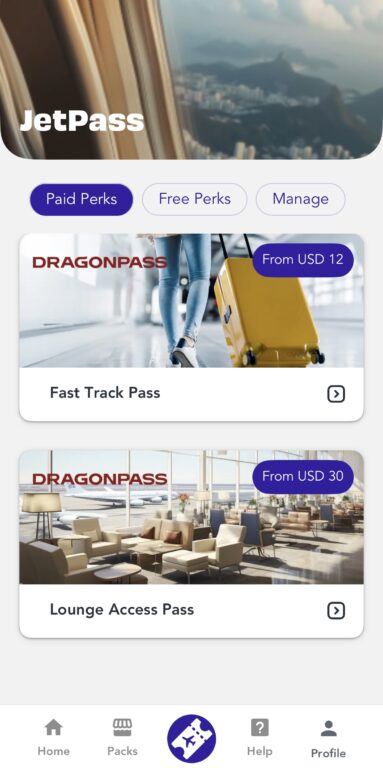
SmartDelay: One of Jetpac’s most unique and valuable features is its SmartDelay program, which provides free access to airport lounges if your flight is delayed by more than an hour. Lounge access is granted via DragonPass (a global airport lounge network), and it covers you and up to five companions - perfect for group travelers. This feature is Included automatically with most Jetpac eSIM purchases.
Tip: One practical note: to activate SmartDelay, you need to register your flight in the Jetpac app at least 24 hours before departure. You can register up to two flights per data pack, so it's worth doing this as soon as your plans are confirmed rather than at the gate.
Voice calling (beta): Jetpac now offers a beta voice feature for outgoing calls to 50+ countries, starting at $1.99. It's available via the app on iOS only for now. Not a replacement for your main number, but useful for the occasional call without jumping to WhatsApp — worth knowing about if you're iPhone-based and want that option.
Lounge Access ad-on: When purchasing your eSIM, you can add on lounge access for airports around the globe, at a very reasonable price. Most options are $30 - $35 per pass, and they offer discounts if you’re buying more than one.
Usage of certain apps after data runs out: You can now keep using WhatsApp, Uber, Grab, and Google Maps for free if your data runs out. This makes Jetpac an incredibly appealing option compared to other esims.
Membership Programmes for Frequent Travelers: *2026 Update: These membership programs are no longer widely offered, though they are not officially retired yet, so we are leaving this info in for now. Jetpac tells us they have shifted their focus more toward pay-as-you go and Limitless plans instead of subscriptions.*
Jetpac offer two different membership programmes which are a great way to save money if you travel often and regularly find yourself purchasing eSIMs. Their ‘JetPro’ membership costs $45 a month and includes 7GB of global data which is usable in over 150 countries, one free DragonPass lounge pass per month, priority security fast track at select airports, and a VPN trial. This is great value for money in my opinion. They also offer a cheaper option, the ‘JetFlex’ subscription, which offers a 15% saving on standard pricing.

Review: Would I Recommend Jetpac?
I’ve tried and tested a whole host of eSIM providers over the years, and I can confidently say that Jetpac really stands out from the crowd.
The prices they offer are significantly cheaper than other providers, especially with the various sales and offers they have.
My experience setting up my Jetpac eSIM could not have been easier. My eSIM was activated within 5 minutes of purchasing, and I appreciated having both QR code and direct installation options to get me up and running.
Once activated, I had service straight away, and for the most part, I had a strong signal - although this did vary more than I might have expected.
The biggest standout features for me are the SmartDelay lounge access and the JetPro membership - these are both real game changers for anyone who travels regularly. The new feature of access to certain essential apps for free after data is exhausted is a huge bonus.
This is the first time I’ve seen these types of inclusions from an eSIM provider, and they would definitely encourage me to purchase again in the future.
2026 update: When we initially reviewed this eSIM, Jetpac did not offer an unlimited data option. Jetpac has since expanded their plan types since we first reviewed them. Unlimited data plans are now available in select regions and countries, which addresses what used to be the main criticism. If you're a heavy data user, it's worth checking whether unlimited is available for your specific destination before defaulting to a capped pack.
I did find that coverage was spotty at times, and we all know how frustrating that can be when you’re on the road.
However, considering Jetpac's budget-friendly pricing, premium travel benefits, and flexible plans, I’d absolutely recommend their service for anyone who wants a solid eSIM that offers additional perks to make travel that bit easier.

Yen
Tuesday 30th of September 2025
I love your very thorough review. I'm not very tech savvy and your guide is just so intuitive as it answers all my questions and doubts. And I like how you put in the shots of each step of the process. Thank you.
Cath
Wednesday 17th of September 2025
Poor- info on the app is jumbled on iPhone screen. Constantly bombarde eith messages to refer others, Help desk is robotic and unhelpful, Don’t waste your time
Skiptraveller
Saturday 6th of September 2025
JETPAC is terrible. Tried to use it across Thailand and Europe. 100% failure, and only responded to help after I embarrassed them on their Facebook app.